Introduction to Java
Why do We Need Programming Languages? • Communication with Computers: Programming languages allow humans to communicate instructions to computers in a way they can understand.
Curious & strong learner of Software Engineering x developer from India with strong hands-on in Full-Stack Development, DevOps, Site-Reliability Engineer and Cloud-based Technologies. I have command on various frontend technologies like HTML, CSS, Javascript(JS), React JS and backend technologies like MySQL, Node.js, MongoDB, etc. I believe enthusiastic and always willing, learn more and create solid things that make things work faster & make reliable team to grow together. I write blogs on Technologies & Tools that I learn and have experience on working on it. I also share on X (Earlier Twitter).
Java History -
Home: Sun Microsystems (Later on Acquired by ORACLE Corporation).
Author: James Gosling
Objective: To Prepare simple Electronic Consumer Goods.
Project: Green
First Version: JDK 1.0 (1996, Jan-23rd)
Type of Software: Open-Source Software
Purpose: Originally made for devices like TV, remotes, etc.
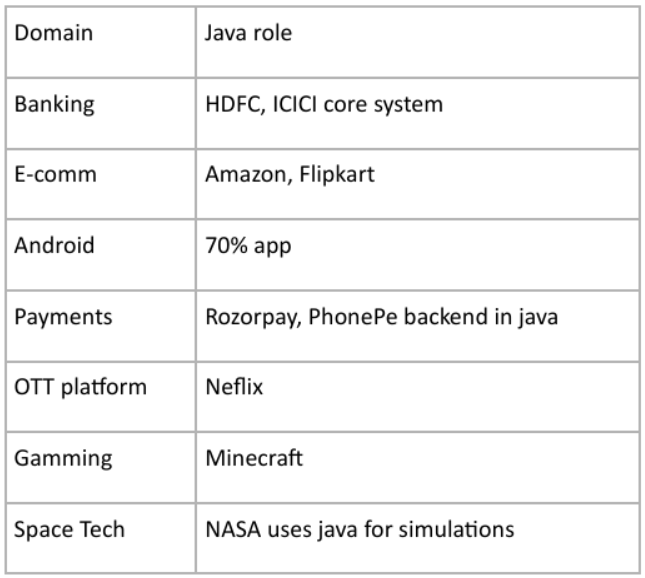
Why we learn Java in 2026?
1). 90% - 500 Fortune Companies used in for their Backend Services and Microservices.
2). Amazon, Uber, Netflix use Java for their Backend.
Java still is the best choice for -
1). Android
2). Banking and FinTech
3). Big Data - Hadoop (Java - Based)
4). Games
5). Cloud, DevOps
Why one should learn Java in 2026?
1). Secure and Scalable
2). Most in Demand
3). Backend System of many companies built using Java
4). Modern Tech -> KafKa, Docker, Kubernetes, AWS, etc.
5). Easy to Learn
How Java Works Internally?
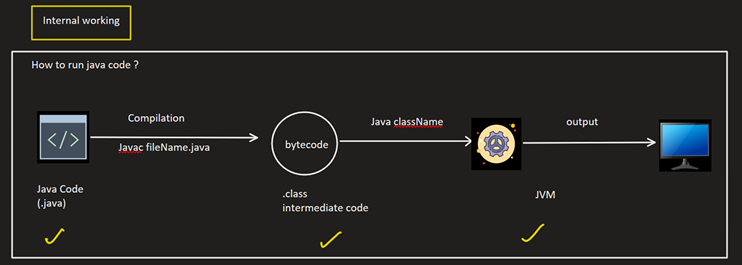
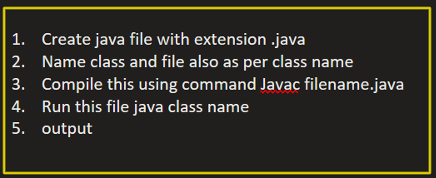
Internal of Code Execution
-------------------------------
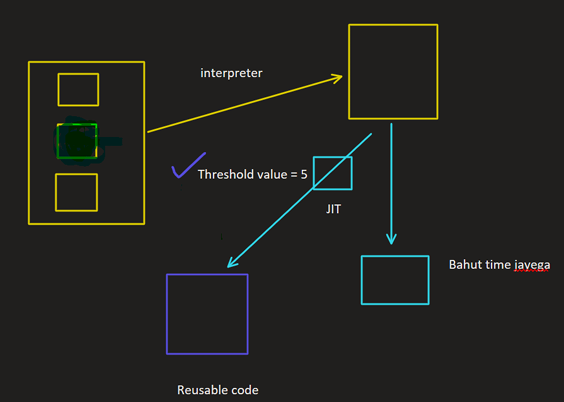
Case 1: Without JIT(Just-In-Time)
Use Interpreter and Each instruction Converted line by line.
Case 2: With JIT
Code is compiled once and reused.
What is JVM (Java Virtual Machine)?
1). Load .class file
2). Very bytecode
3). Heap Stack Memory
4) JIT
What is JRE (Java Runtime Environment)?
JRE = JVM + Runtime Lib
1). It Provide Necessary Library to Run the Java Application.
2). Does not Provide Compilation (Javac)
JDK (Java Development Kit)
1). JDK = JRE + Development Tools (Javac, JavaDoc, Jar)
2). Need to Develop & Run the Java Program.
3). Contains everything in JRE + Compiler, Debugger
What is JIT?
It is a part of JVM which converts frequently used bytecode into machine code.
NOTE: JVM Read Line by Line just like Interpreter but if when we repeat a task again & again, then JIT do that by creating cache for the same code and convert the code to machine code from that cache code.
Some questions that one should know -
1). Is Java is compiled Language or Interpreted?
Java is both complied and Interpreted.
- First, Java source code (.java) file is compiled by Java Compiler (javac) into bytecode (.class) files.
- then, the bytecode is interpreted or compiled at runtime by the JVM.
2). What is JVM and What does it do?
JVM (Java Virtual Machine) is a virtual machine that runs Java bytecode.
It is part of the Java Platform developed by Oracle Corporation.
What JVM does:
• Loads .class files.
• Verifies bytecode for security.
• Interprets or compiles bytecode to machine code.
• Manages memory (Heap, Stack).
• Handles Garbage Collection.
• Provides Platform Independence.
👉 Because of JVM, Java follows "Write Once, Run Anywhere".
3). Difference Between JDK, JRE, and JVM?
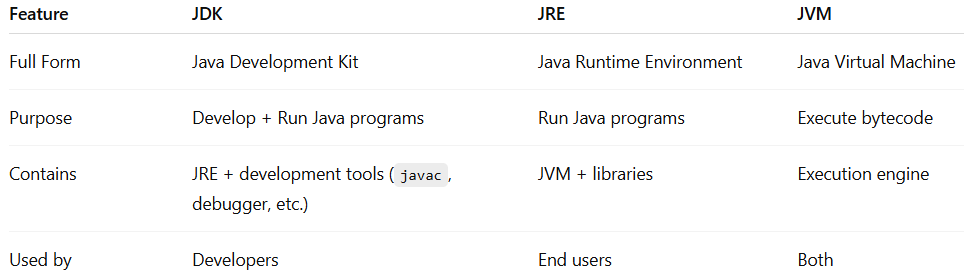
Simple Hierarchy: JDK > JRE > JVM
• JDK = For Developing Java Programs.
• JRE = For running Java Programs.
• JVM = Actually Runs the Bytecode.
4). How does JIT improve Performance?
JIT (Just-In-Time compiler) is part of the JVM.
JIT compiles frequently used bytecode into native machine code
• Stores it in memory
• Reuses it
Benefits:
• Faster execution
• Optimizes hot code paths
• Reduces repeated interpretation
👉 That’s why Java applications become faster after running for some time.
5). Can we run Java program with only JRE?
✅ Yes, if you already have the .class file.
You only need:
• JRE installed
• .class file
You run it using: Java ClassName
❌ You cannot compile .java files without JDK (because javac is in JDK).
6). Differences Between Java and other?
C and C++ are static Programming languages but Java is dynamic programming language.
• If any programming language allows memory allocation for primitive data types at compilation time [Static Time] then that programming language is called as Static Programming Language. For Example - C and C++.
• In C & C++ Applications, Memory will be allocated for primitive data types at compilation time only, not at runtime.
• If any programming language allows memory allocation for primitive data types at runtime, not at compilation then that programming language is called a Dynamic Programming Language. For Example - Java.
• In Java Applications, Memory will be allocated for primitive data types at runtime only, not at compilation time.
• NOTE: In Java Applications, Memory will be allocated for primitive data types at the time of creating objects only, in java applications, objects are created at runtime only.
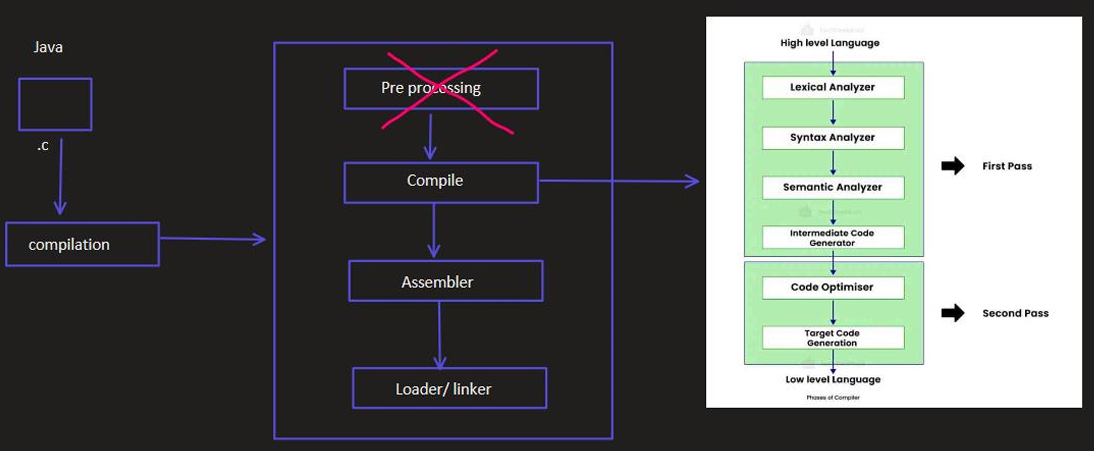
7). Pre-Processor is Required in C & C++ but not in Java?
In Case of C & C++, the complete predefined library is provided in the form of header files.
If we want to use predefined library in C and C++ Applications, we have to include header files in C and C++ Applications, for this we have to use #include<>statement.
For Example -> • #include <studio.h>
• #include<conio.h>
• #include<math.h>
If we compile C and C++ Applications then Pre-Processor will perform the following actions.
• Pre-Processor will recognize all #include<>statement.
• Pre-Processor will take all the specified header files from #include<>statement.
• If the specified header files are existed then Pre-processor will load the specified header files to the memory, this type of loading predefined library at compilation time is called as "Static Loading".
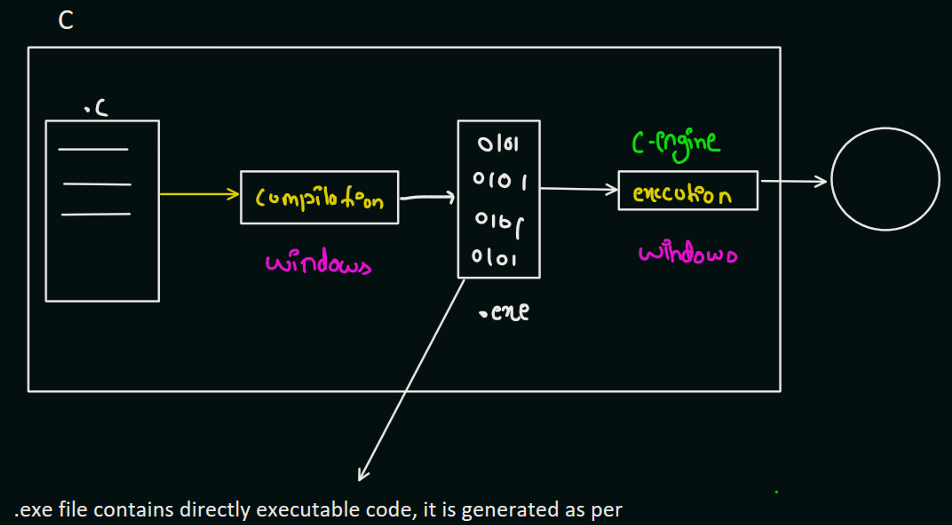
Code Execution in C/C++
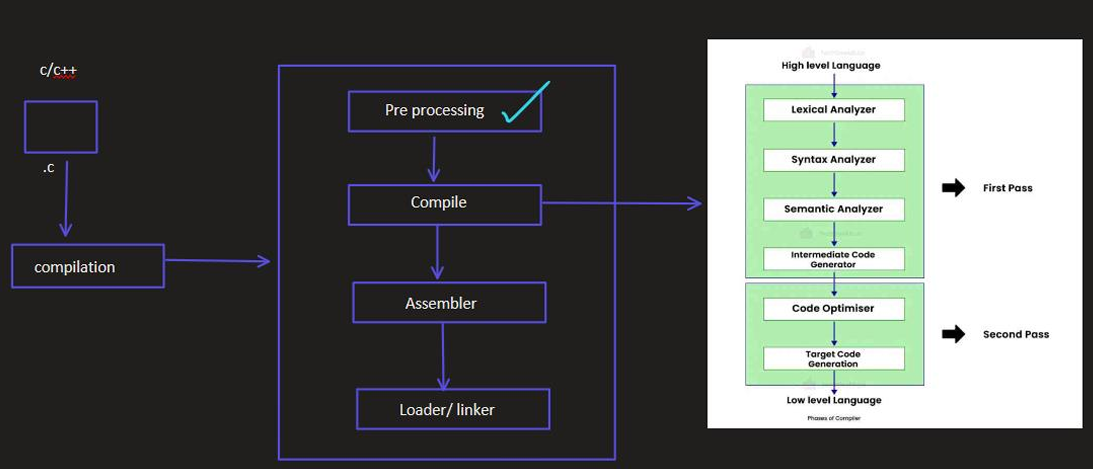
Code Execution in Java
• C and C++ are platform dependent Programming languages, But Java is Platform Independent programming Language.
8). Platform Dependent vs Platform Independent?
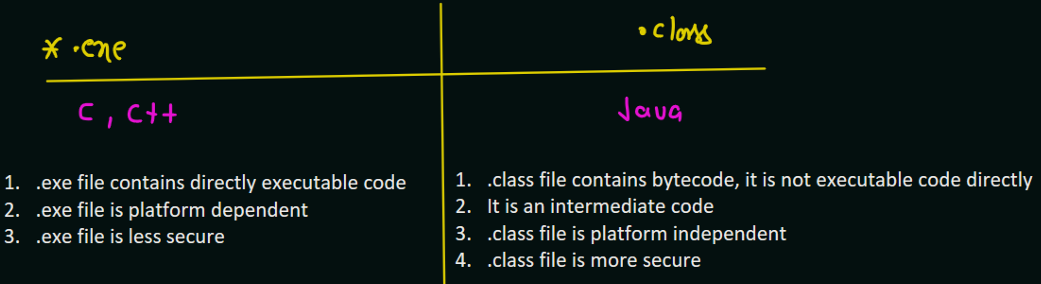
Platform Dependent: A Programming Language that allows its applications to be compiled and executed on the same operating system (e.g., C with .exe files).
Platform Independent: Java with its .class files containing bytecode, can be executed on any operating system.
9). What is the difference between .exe file and .class file?
Java Program Structure:
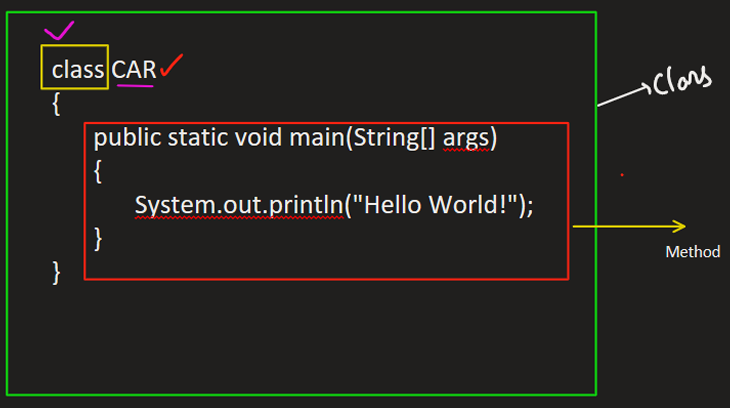
10). What is Class?
A Class is blueprint/template (CAR) from which individual object are created.
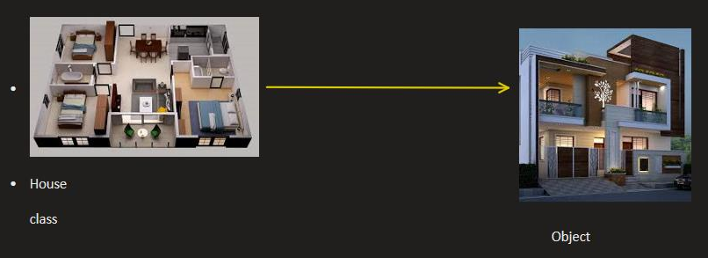
NOTE: Why is everything is Java inside Class? - Java is pure object-oriented programming language that's why all things are wrap inside object.
11). What is Object?
• Real World Instance of Class
• Running of Instance of Class
Class -> Blue for CAR
Object -> Actual CAR built using the blueprint -> Harrier, BMW, Porsche
12). What are Methods?
• Block of code that perform specific tasks.
• It is used to organize code into reusable chunks.
• The main method is the entry point of any Java program.
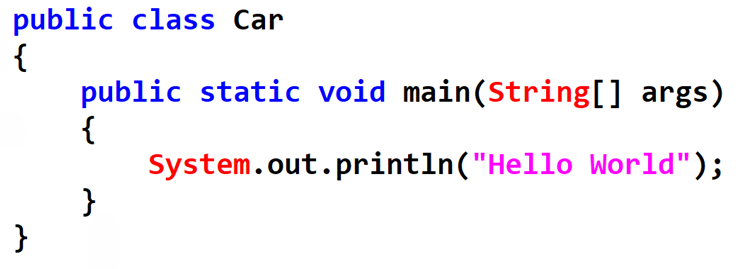
13). What are Variables?
Variables are used to hold/share the used program execution, we need to specify that which type of variable, to specify type of variable we will use which is called "Data type".
14). Types of different Data Types?
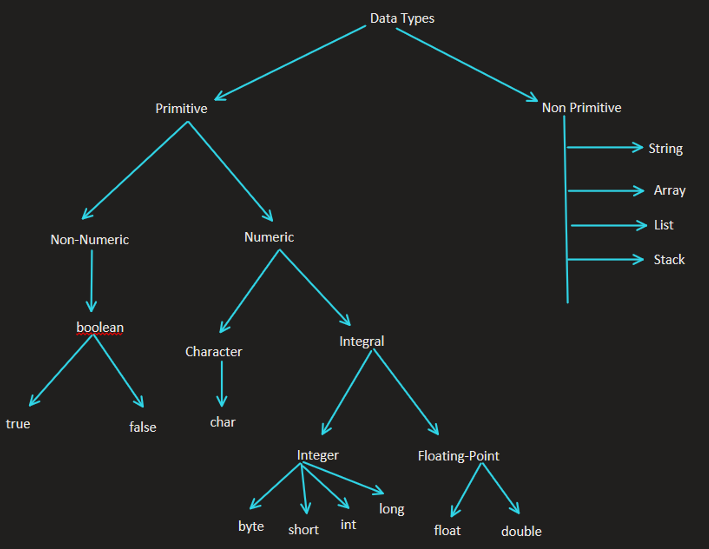
15). What are Identifiers?
They are the names given to class, variables, method and interfaces.
• Different Rules for naming Identifiers ->
- Valid Char : lower case, upper case, digit, , \(
- Start with : letter, _, \) [it cannot start with digit]
- Case sensitive : car, CAR, CaR
- Reserved keyword : int, for, if, else (can't be used).
16). What is type Casting?
There are two types of casting:
• Implicit Casting: Cast data type from Lower to Upper.
• Explicit Casting: Upper data type into lower, chances of losing data.